Performance-Based API Task
A Performance-Based API Task lets your own backend decide how many points a user has earned — not just pass/fail. TaskOn calls a URL you provide, you return a point value, and TaskOn awards it.
Use this whenever completion isn’t binary — trading volume, deposit size, in-game score, or any metric where “how much” matters more than “did they or didn’t they.”
If you only need a pass/fail answer with no point value, use Completion-Based API Task instead — it’s a simpler contract.
When should I use this?
The classic case is a trading or activity competition: trade 100 USDT and earn 10 points, trade 1,000 USDT and earn 100 points, and so on. Your backend already tracks this; you just expose it as an API and let TaskOn read the score.
Points from this task type plug into TaskOn’s reward mechanics — a leaderboard ranking, or a reward pool split proportionally by points earned. You configure the reward side separately in the campaign; this task’s job is only to report the number.
How it works
Unlike a Completion-Based task, this one isn’t one-shot: TaskOn doesn’t cap how many times a user can trigger a recheck (there’s a refresh action on the task card), so your endpoint should expect to be called repeatedly for the same user as their real-world activity changes.
Each response should be the user’s current total for this task, not an amount to add. TaskOn treats the point value you return as authoritative and credits only the difference from what it last stored — it does not sum your raw values across calls. If your API returns an incremental delta instead of a running total, users will be over- or under-credited every time they refresh.
If your total legitimately goes down for a user (a correction, a reversed trade), TaskOn won’t claw back points they’ve already been credited — it just stops crediting more until your number passes their previous high again. You don’t need to guard against this on your end.
Binding happens automatically the same way as Completion-Based tasks — see that guide’s “How it works” section for the wallet-connect / OAuth details. By the time your endpoint is called, TaskOn has already resolved a real address or account for the user.
If a user has bound more than one wallet on the chain you configured, TaskOn calls your endpoint once per address and uses the first one that returns
point > 0.
Supported user identifiers
Pick one identifier type when you set up the task.
Social media account
| Type | Example value sent to your API | Notes |
|---|---|---|
| X (Twitter) handle | taskonxyz | The handle |
| Discord username | someuser | The Discord username, not the numeric Discord ID |
| Telegram username | someuser | The Telegram username — if the user has no public @username set, TaskOn usually falls back to their display name, then their numeric ID. That fallback only applies to one of TaskOn’s Telegram login paths, though; depending on how the user connected, you may occasionally receive an empty string. Don’t assume this is always a clean, non-empty handle |
[email protected] | The email on the user’s linked social account |
This is a different set of values than the Completion-Based API Task sends — that one sends numeric IDs for Discord/Telegram. This task type always sends the username string instead. Don’t reuse identifier-matching logic between the two without checking which one you’re implementing.
Wallet address
Pick one chain when you set up the task. TaskOn sends whichever address the user has bound for that chain:
EVM, Solana, Starknet, SUI, Tron, BTC, Aptos, Nibiru, Ton, Kaspa
This list reflects what TaskOn supports today — check the network dropdown in your dashboard for the current options, since new chains get added over time.
Wallet and social values are always lowercased before TaskOn sends them to you — on every chain, not just EVM. Match on the lowercased form on your side.
Customized data
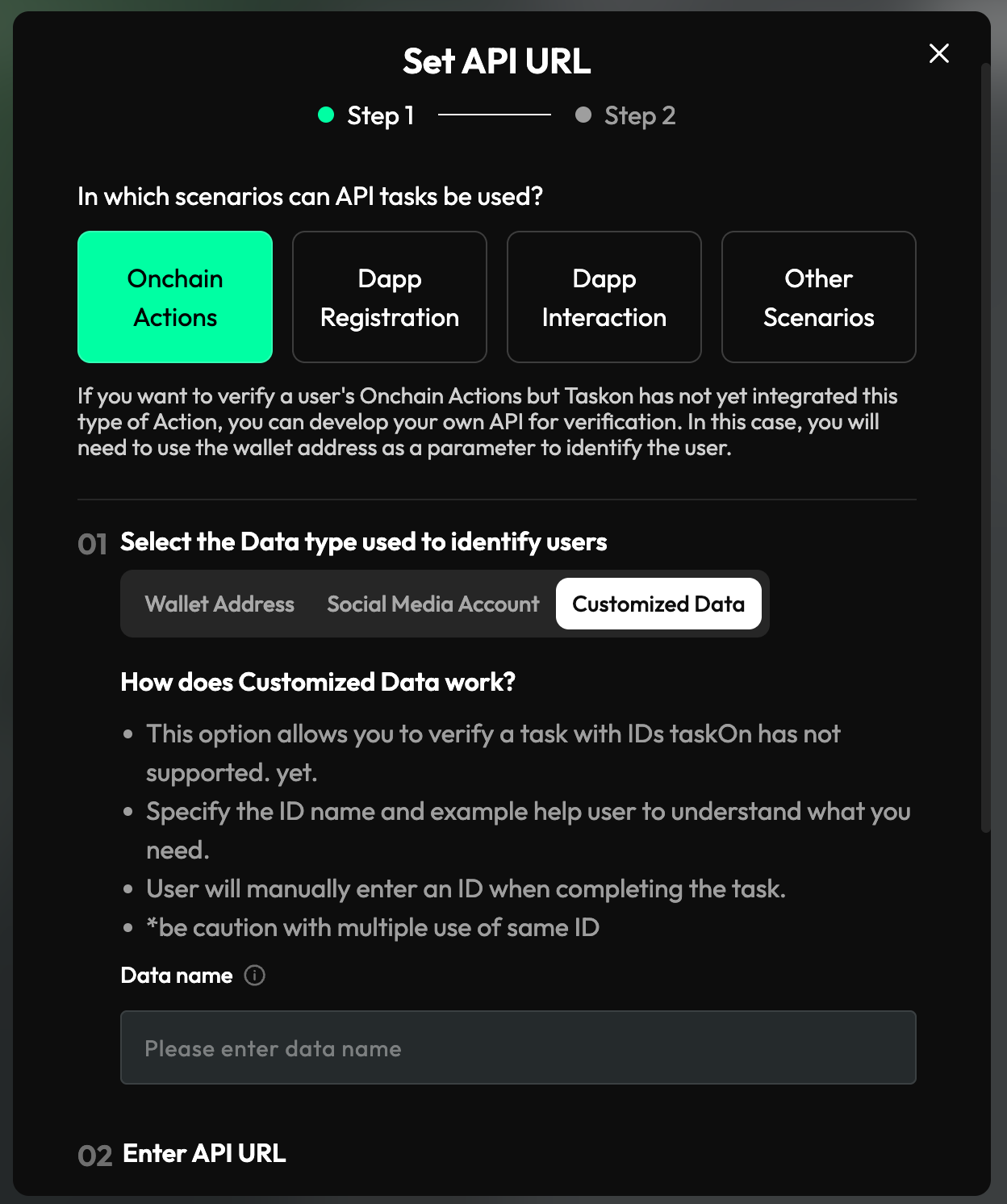
If the metric you’re tracking doesn’t map to a wallet or a social account — a purely internal ID, for example — choose Customized Data. The user types this value in themselves when they attempt the task, so give it a clear Data name (e.g. “Your Order ID”) so they know what to enter. TaskOn sends it to your endpoint as-is (not lowercased).
To discourage abuse, TaskOn caps a non-qualified user at 50 distinct submitted values per task — resubmitting the exact same value repeatedly doesn’t count against this, but 50 different wrong guesses blocks further attempts until they qualify.
Build your verification endpoint
Requirements
- A public URL TaskOn’s servers can reach directly — plain HTTP is technically accepted, but use HTTPS in practice (see Security notes below).
- Accepts
GET— TaskOn never sends a request body. - Responds within 10 seconds — slower than that is treated as a failure.
- Always returns HTTP
200— even for a “zero points” answer. Any other status code is treated as your endpoint being unavailable. - Returns the exact JSON shape below.
- No automatic retries — TaskOn makes one attempt per click. If that attempt times out or errors, the user has to try again themselves.
Request
Wallet address or social media account:
GET https://your-api.example.com/reward?address=<identifier>Customized Data:
GET https://your-api.example.com/reward?data=<value>&user_id=<opaque_id>| Query param | When it’s sent | Description |
|---|---|---|
address | Wallet address or social media account identifiers | Always lowercased |
data | Customized Data identifiers only | The value the user typed in, exactly as entered |
user_id | Customized Data identifiers only | A fixed 16-character token identifying the TaskOn user. It’s base64url-encoded rather than encrypted — technically reversible — but treat it as an opaque per-user key rather than relying on decoding it yourself. Stable per user, so you can use it as a dedupe/lookup key alongside data |
There’s no network query param for this task type, ever — not even during the dashboard’s test step.
If you turned on the Bearer Token option, TaskOn adds it as a standard header:
Authorization: Bearer <your-token>
User-Agent: TaskOn-Server
Response
{
  "result": {
    "point": 100
  }
}pointis an integer — the user’s current total points for this task (see the note above about override vs. incremental semantics).point: 0(or any non-positive value) means “no points yet” — not an error. TaskOn just won’t award anything this time; the user can try again later.- Always respond with HTTP
200, even whenpointis0.
Same footgun as Completion-Based tasks: don’t omit
resultor send"result": null— always send{"result": {"point": 0}}for a zero-points answer. A missing/nullresultis treated as your endpoint being broken, not as a clean zero.
Minimal example (Node.js / Express)
const express = require("express");
const app = express();

app.get("/reward", (req, res) => {
  const { address, data, user_id } = req.query;

  // Optional: enforce the Bearer Token you configured in TaskOn
  const auth = req.headers.authorization;
  if (auth !== `Bearer ${process.env.TASKON_ACCESS_TOKEN}`) {
    return res.status(401).json({ result: { point: 0 } });
  }

  // TODO: replace with your own lookup — address/data identify the user,
  // return their CURRENT total point value for this task
  const point = address
    ? getPointsForAddress(address)
    : getPointsForCustomizedData(data, user_id);

  res.json({ result: { point } });
});

app.listen(3000);
Don’t have a backend to attach this to yet? TaskOn publishes a deployable demo project with a one-click Vercel deploy as a starting point.
Configure the task in your TaskOn dashboard
-
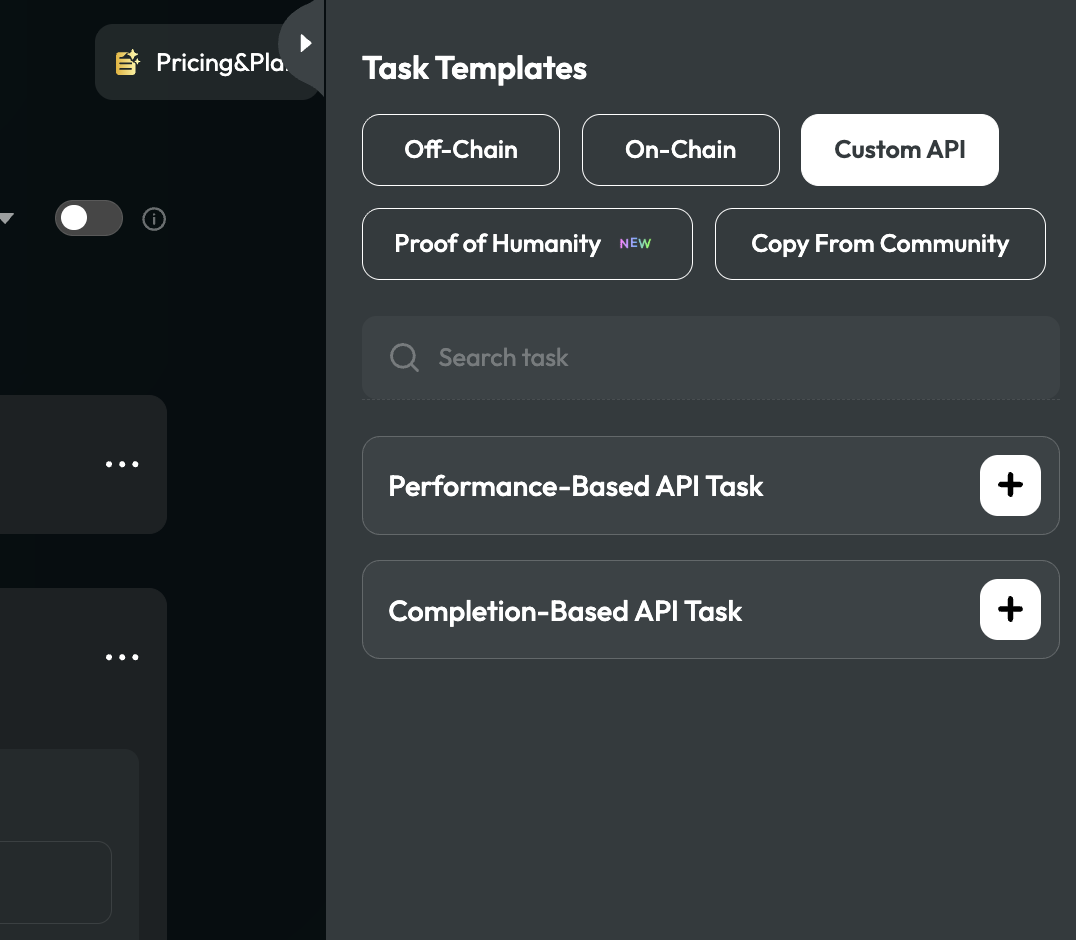
In your campaign or quest, add a task, open the Custom API tab, and choose Performance-Based API Task.
-
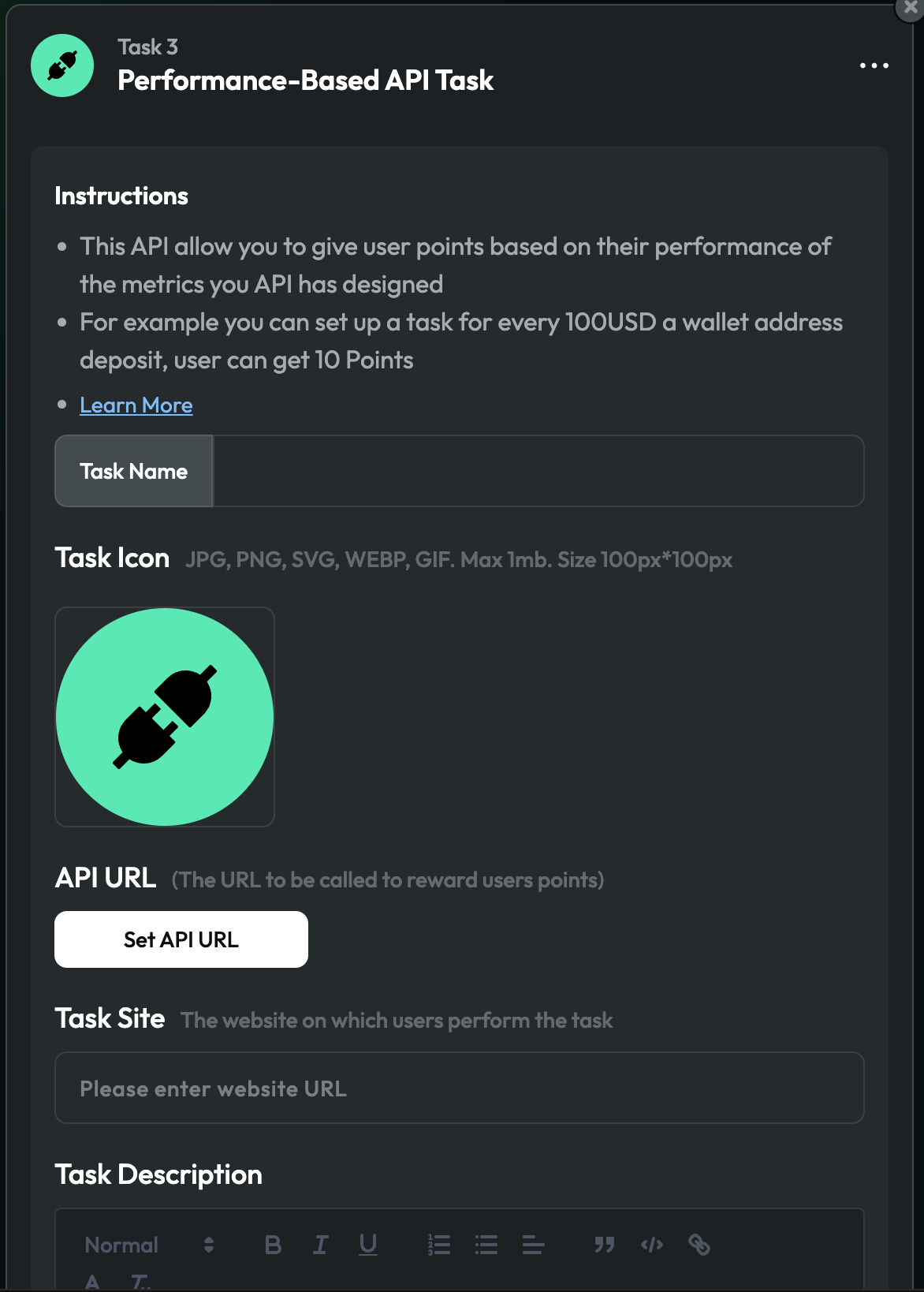
Fill in the task name, icon, and description.
-
Click Set API URL.
-
Choose how you’ll identify users — Wallet Address, Social Media Account, or Customized Data — and fill in the matching fields. For Customized Data, give it a clear Data name so users know what to type.
-
Enter your API URL.
-
If you want to restrict access to TaskOn only, turn on Restrict API access exclusively to TaskOn and set a Bearer Token. Use HTTPS whenever you do this — a token sent over plain HTTP can be read in transit.
-
Click Next to test the connection: enter one account/address/value that currently has points, then click Verify. You’ll see the raw JSON your endpoint returned, so you can confirm it looks right.
-
Once the test comes back with a positive point value, click Confirm to save the task.
Troubleshooting
- Verification times out — your endpoint is too slow or unreachable. Test it directly with
curl, check your own logs, and move any heavy lookup work to a cache or background job so you can answer within 10 seconds. - “The API service returns an incorrect status code or an invalid structure” — your endpoint returned something other than
200, or the body isn’t valid JSON matching{"result":{"point":N}}. Check for stray whitespace, a wrapping array, or a different key name. - Test verification always comes back with 0 points — confirm the exact value TaskOn sends matches what your database expects. Remember
addressarrives lowercased even on non-EVM chains, and confirm you’re returningpoint, notpointsorscore. - Points go up and down unexpectedly on refresh — you’re very likely returning an incremental delta instead of the user’s running total. Return the full current value every time; TaskOn overrides, it doesn’t add.
- Customized Data submissions stop working after a while — check whether the user has hit the 50-distinct-value cap for non-qualified submissions on this task (retrying the same value doesn’t count against it, only different ones do).
Security notes
- Treat the Bearer Token as a secret — store it in your environment or secret manager, not in code, and rotate it if it ever leaks.
- The Bearer Token is the only real access control here.
User-Agent: TaskOn-Serveris sent for your own logs/debugging, not as an authentication mechanism — it can be set by anyone. - Serve the endpoint over HTTPS, especially if you’re using a Bearer Token.